Blog

  • What’s the Difference Between Stories & Highlights on Instagram?

    If you use Instagram regularly, you’ve probably wondered what’s the difference between stories & highlights and which one you should use for your content. Both features look similar at first glance, but they serve very different purposes. Whether you’re a creator, brand, or casual user, understanding this difference helps you manage visibility, engagement, and long-term presence. If you’re learning more about Instagram story features, tools like Instagram Story Downloader often help users understand how stories and saved content actually work.

    Let’s break it all down in simple terms—no confusion, no tech jargon.

    What Are Instagram Stories?

    Instagram stories are short, temporary posts that disappear automatically after 24 hours. They appear at the top of the Instagram feed and are designed for quick, real-time sharing.

    Stories are best for:

    • Daily updates
    • Behind-the-scenes moments
    • Polls, questions, and stickers
    • Time-sensitive announcements

    They create urgency because viewers know the content won’t stay forever.

    What Are Instagram Highlights?

    Instagram highlights are saved stories that live permanently on your profile under your bio. You can group multiple stories into one highlight and give it a custom name and cover.

    Highlights are useful for:

    • Showcasing important content
    • Saving FAQs, services, or tutorials
    • Organizing brand information
    • Making your profile more informative

    Unlike stories, highlights don’t disappear unless you remove them.

    What’s the Difference Between Stories & Highlights? (Core Comparison)

    Understanding the difference between stories & highlights becomes easier when you compare their behavior.

    Main Differences at a Glance

    • Stories
      • Visible for 24 hours
      • Appear at the top of the feed
      • Designed for short-term engagement
    • Highlights
      • Stay on your profile permanently
      • Visible to profile visitors anytime
      • Used for long-term value

    Although highlights come from stories, their purpose is completely different.

    Visibility: Stories vs Highlights

    Visibility is one of the biggest differences.

    Stories:

    • Show up immediately to followers
    • Prioritized by Instagram’s algorithm
    • Often get quick views and reactions

    Highlights:

    • Seen when someone visits your profile
    • Do not appear in the main feed
    • Focus more on profile branding

    If visibility matters short-term, stories win. For long-term impact, highlights are stronger.

    Engagement Differences Between Stories & Highlights

    Stories are interactive by design. You can:

    • Add polls and quizzes
    • Receive replies and reactions
    • Track viewers while the story is live

    Highlights:

    • Do not show viewer lists
    • Do not collect new engagement
    • Act more like a content showcase

    This is why creators often post to stories first, then save the best ones as highlights.

    How Stories Turn Into Highlights (Step-by-Step)

    Here’s how you can convert a story into a highlight:

    1. Post a story
    2. Open the story before it expires
    3. Tap “Highlight”
    4. Create a new highlight or add to an existing one
    5. Choose a cover and title

    Once added, it stays on your profile until you remove it.

    Which One Should You Use?

    Use Instagram stories when:

    • Content is time-sensitive
    • You want quick interaction
    • You’re sharing daily moments

    Use Instagram highlights when:

    • Content is evergreen
    • You want profile visitors to learn quickly
    • You’re building brand trust

    Most successful profiles use both together.

    FAQs – People Also Ask

    What’s the difference between stories & highlights on Instagram?

    Stories disappear after 24 hours, while highlights stay permanently on your profile.

    Can everyone see my Instagram highlights?

    Anyone who can view your profile can see your highlights unless restricted by privacy settings.

    Do highlights get views like stories?

    No. Highlights don’t show viewer lists or engagement metrics.

    Can I add old stories to highlights?

    Yes. Stories saved in your archive can be added anytime.

    Are highlights better than stories?

    They serve different purposes. Stories are for real-time engagement, highlights are for long-term visibility.

    Conclusion: Stories Create Moments, Highlights Preserve Them

    So, what’s the difference between stories & highlights? Stories are temporary, interactive, and fast-paced—while highlights act as a curated collection that defines your profile.

    If you’re exploring Instagram content features or tools related to stories, reviewing resources or policies like the Privacy Policy can also help you understand how Instagram content visibility works.

    If this guide helped you, share it, leave a comment, or explore more Instagram tips to improve your profile strategy.
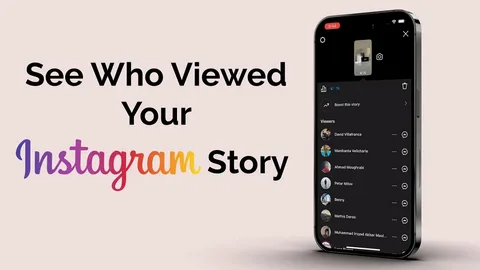

  • Can I Tell Who Looks at My Instagram Stories? (Complete Privacy Guide)

    Can I Tell Who Looks at My Instagram Stories? (Complete Privacy Guide)

    Instagram stories are one of the most popular features on the platform, but many users still wonder can I tell who looks at my Instagram stories and how accurate that information really is. Understanding this helps creators, businesses, and everyday users track engagement while maintaining privacy. If you’re exploring Instagram story features or need clarity on story behavior, resources like Instagram Story Downloader often help users understand how stories, views, and visibility actually work.

    In this guide, we’ll explain exactly who you can see, who you can’t, and what Instagram tracks behind the scenes, using simple steps and real examples.

    Can I Tell Who Looks at My Instagram Stories? (Short Answer)

    Yes, Instagram allows you to see who viewed your stories, but only within certain limits.

    You can see:

    • The usernames of people who viewed your story
    • Viewers listed while the story is active
    • Engagement, like replies or reactions

    However, there are also things Instagram does not show, which often confuse users.

    How to See Who Viewed Your Instagram Story

    Checking story viewers is quick and simple.

    Step-by-Step Method

    1. Open Instagram
    2. Tap your active story
    3. Swipe up on the screen
    4. View the list of people who watched it

    This list updates in real time while the story is live.

    How Long Can You See Story Viewers?

    Instagram story visibility works on a time limit.

    • During the 24-hour story duration → viewers are visible
    • Up to 48 hours after posting → limited insights available
    • After that → viewer list disappears

    If you add a story to highlights, the viewer list does not remain visible.

    What Instagram Story Viewers Can and Cannot See

    Understanding this helps avoid misunderstandings.

    What You CAN See

    • Username of viewers
    • Replies and reactions
    • Sticker interactions

    What You CANNOT See

    • How many times someone viewed your story
    • If someone screenshotted or screen-recorded
    • If someone downloaded the story

    For clarity on privacy and usage, many users review the Privacy Policy related to Instagram tools and story features.

    Why Are Story Viewers Sometimes in a Strange Order?

    Instagram does not show viewers randomly.

    The order may be influenced by:

    • Accounts you interact with most
    • Profile visits
    • Likes, comments, and DMs
    • Engagement patterns

    It’s not chronological, especially after many views.

    Can Someone View My Instagram Story Without Me Knowing?

    Generally, no — every viewer is logged.

    However:

    • Some third-party apps claim to allow anonymous viewing
    • Instagram itself does not support anonymous views
    • If someone views your story, their name will appear

    If privacy is a concern, adjusting story settings is recommended.

    How to Control Who Sees Your Instagram Stories

    You can manage story visibility easily.

    Useful Privacy Options

    • Hide stories from specific users
    • Share stories with close friends only
    • Block or mute unwanted viewers
    • Restrict certain accounts

    These settings give you more control over who appears in your viewer list.

    LSI Keywords Used Naturally

    • See who viewed your Instagram story
    • Instagram story viewers
    • Who watched my Instagram story
    • Instagram story view list
    • Instagram story privacy
    • Check Instagram story views
    • Instagram story analytics

    FAQs – People Also Ask

    Can I see who viewed my Instagram story after 24 hours?

    You can see limited insights for a short time, but the full viewer list disappears.

    Can someone watch my Instagram story without showing up?

    No. Instagram shows every account that views your story.

    Does Instagram show how many times someone watched my story?

    No. Only total views are shown, not repeat views.

    Can business accounts see more story details?

    Business and creator accounts get engagement insights, but viewer names work the same way.

    Can someone tell if I check their story multiple times?

    No. Instagram does not reveal repeat views.

    Conclusion: Instagram Story Viewers Are Visible — With Limits

    So, can I tell who looks at my Instagram stories? Yes — Instagram shows you exactly who viewed your story while it’s active, but it does not reveal downloads, screenshots, or repeat views.

    If you want to understand Instagram stories better or explore tools related to story features, you can find helpful resources or reach out through Contact Us on Instagram Story Downloader.

    If this guide helped you, share it, save it for later, or explore related Instagram tips to stay informed.

  • Can I Screenshot an Instagram Story? (What Really Happens Explained)

    Can I Screenshot an Instagram Story? (What Really Happens Explained)

    Many Instagram users hesitate before taking a screenshot because they fear the other person might get notified. If you’ve ever wondered can I screenshot an Instagram story, you’re not alone. To better understand Instagram story behavior and privacy, users often explore resources like Instagram Story Downloader, which helps clarify how stories, screenshots, and downloads actually work.

    In this guide, we’ll explain whether Instagram notifies screenshots, when it does, and how story privacy really works, so you can use Instagram with confidence.

    Can I Screenshot an Instagram Story Without Them Knowing?

    The short and clear answer is yes.

    Instagram does not notify users when someone screenshots:

    • A regular Instagram story
    • A public photo story
    • A public video story

    This means you can screenshot most stories without the creator being alerted.

    When Does Instagram Send Screenshot Notifications?

    This is where confusion usually starts.

    Instagram Sends Notifications Only In These Cases

    Instagram will notify the sender if you screenshot:

    • Disappearing photos sent via direct messages
    • Disappearing videos sent via direct messages

    These are private, one-time view messages — not regular stories.

    Instagram Does NOT Notify For

    • Story screenshots
    • Screen recordings of stories
    • Downloads using online tools

    Understanding this difference helps clear up most fears.

    How Instagram Story Views Actually Work

    Instagram tracks views, not downloads.

    What creators can see:

    • Who viewed their story
    • Who replied or reacted
    • Who interacted with stickers

    What creators cannot see:

    • Screenshots
    • Screen recordings
    • Saved copies in your gallery

    So if you only view and screenshot, nothing extra is revealed.

    Can I Screenshot an Instagram Story and Save It Safely?

    Yes, and there are multiple ways users do it.

    1. Taking a Simple Screenshot

    This works best for image-based stories.

    • Open the story
    • Take a screenshot
    • Crop if needed
    • Save to gallery

    No alert is sent.

    2. Screen Recording for Video Stories

    For video stories:

    • Start screen recording
    • Play the story
    • Stop recording
    • Trim the clip

    This method also stays private.

    3. Using Online Instagram Tools

    Some users prefer saving stories directly in original quality.

    • Copy the story link
    • Use an online Instagram story downloader
    • Save content anonymously

    For responsible use and data handling, you can review the Privacy Policy of Instagram Story Downloader.

    Is Screenshotting Instagram Stories Ethical?

    Screenshotting is allowed, but usage matters.

    Good practices include:

    • Using screenshots for personal reference
    • Asking permission before reposting
    • Giving credit if shared publicly
    • Avoiding private or sensitive content

    You can also review acceptable use details in the Terms & Conditions of Instagram Story Downloader.

    Common Myths About Instagram Story Screenshots

    Let’s clear up a few misconceptions:

    •  “Instagram notifies all screenshots” → False
    •  “Screen recording is detected” → False
    •  “Story owners can see saves” → False

    Only direct disappearing messages trigger notifications.

    FAQs – People Also Ask

    Can I screenshot an Instagram story without notification?

    Yes. Instagram does not notify screenshots of regular stories.

    Does Instagram notify when you screen record a story?

    No. Screen recording stories remain private.

    Can someone see if I saved their Instagram story?

    No. Instagram does not show save or download activity.

    What happens if I screenshot a disappearing DM photo?

    The sender will receive a notification.

    Is it safe to use online tools to save stories?

    Yes, if the tool does not require login credentials and respects privacy.

    Conclusion: Screenshotting Instagram Stories Is Safe (With Limits)

    So, can I screenshot an Instagram story?
    Yes — and Instagram will not notify the other person for regular stories. As long as you’re not dealing with disappearing direct messages, screenshots, and screen recordings remain private.

    If you want to better understand Instagram story features or safe ways to save content, you can explore resources or reach out through Contact Us on Instagram Story Downloader.

    If this article helped you, share it, bookmark it, or explore more Instagram tips to stay informed.

  • How Do You Save an Instagram Story to Highlights? (Complete Beginner-Friendly Guide)

    How Do You Save an Instagram Story to Highlights? (Complete Beginner-Friendly Guide)

    Instagram stories disappear after 24 hours, but highlights let you keep important stories visible on your profile for as long as you want. If you’ve ever wondered how do you save Instagram story to highlights, you’re in the right place. Many creators also use tools like Instagram Story Downloader to manage and understand story features better, especially when organizing long-term content.

    In this guide, you’ll learn how to save an Instagram story to highlights step by step, along with smart tips to organize, edit, and optimize highlights for better profile engagement.

    What Are Instagram Highlights and Why Are They Important?

    Instagram highlights are story collections that appear right below your bio. Unlike regular stories, they don’t disappear after 24 hours.

    Highlights help you:

    • Showcase your best content
    • Organize stories by topic
    • Improve profile appearance
    • Help new visitors understand your brand or personality quickly

    That’s why knowing how to save an Instagram story to highlights is essential for both personal and business accounts.

    How Do You Save an Instagram Story to Highlights While It’s Live?

    Saving a story to highlights while it’s still active is the easiest method.

    Step-by-Step Method

    1. Open Instagram and view your active story
    2. Tap the Highlight icon at the bottom
    3. Choose an existing highlight or tap New
    4. Enter a highlight name
    5. Tap Add

    Your story is now permanently saved in highlights.

    How to Save Instagram Story to Highlights After 24 Hours

    Even if your story has expired, you can still add it to highlights using your archive.

    Enable Story Archive First

    Before anything else:

    • Go to Instagram settings
    • Turn on Story Archive

    This ensures all past stories are saved privately.

    Steps to Add an Archived Story to Highlights

    1. Go to your profile
    2. Tap the + icon under bio
    3. Select a story from your archive
    4. Choose a cover image
    5. Name the highlight and save

    This method is perfect for organizing old content into themed highlights.

    How to Create Well-Organized Instagram Highlights

    Creating highlights isn’t just about saving stories — presentation matters.

    Choose Clear Highlight Names

    Use short and meaningful titles like:

    • Travel
    • Reviews
    • Tutorials
    • FAQs
    • Behind the Scenes

    Use Consistent Highlight Covers

    A clean cover design:

    • Makes your profile look professional
    • Improves brand identity
    • Helps visitors navigate faster

    Can You Add Someone Else’s Story to Highlights?

    You can only save your own stories to highlights.
    If someone tags you in their story and you reshare it, that reshared story can then be added to highlights.

    For content you want to keep for reference, some users rely on tools explained in the Privacy Policy of Instagram Story Downloader to understand ethical usage.

    Best Practices for Instagram Highlights

    To make highlights more effective:

    • Keep highlights updated
    • Remove outdated stories
    • Avoid overcrowding one highlight
    • Place the most important highlights first
    • Match highlight themes with your content strategy

    Small improvements here can significantly boost profile engagement.

    FAQs – People Also Ask

    Can I save an Instagram story to highlights without posting it?

    No. A story must be posted first or available in your archive to be added to highlights.

    How long do Instagram highlights last?

    Highlights stay on your profile until you remove them manually.

    Can I edit highlights after creating them?

    Yes. You can add or remove stories, change the cover, or rename highlights anytime.

    Why can’t I see the highlight option on my story?

    This may happen if:

    • The story isn’t fully uploaded
    • The app isn’t updated
    • Archive is turned off

    Can I rearrange highlights on my profile?

    Yes. The most recently updated highlight appears first. Adding or removing a story changes the order.

    Conclusion: Make Your Stories Last with Highlights

    Now you know how to save an Instagram story to highlights — whether the story is live or already expired. Highlights are one of the best ways to keep your best moments visible, organized, and impactful.

    If you want to better understand Instagram story features, privacy rules, or content handling, you can explore helpful resources or reach out through Contact Us on Instagram Story Downloader.

    If this guide helped you, share it, bookmark it, or explore more Instagram tips to level up your profile.

  • Can Someone Know If You Download Their Instagram Story? (Truth Explained Clearly)

    Can Someone Know If You Download Their Instagram Story? (Truth Explained Clearly)

    Many Instagram users wonder about privacy when saving stories, especially when they don’t want the other person to find out. If you’ve ever wondered if someone can tell if you download their Instagram story, you’re not alone. For users who want clarity and safe options, tools like Instagram Story Downloader are often explored for guidance and support.

    In this article, we’ll break down exactly what Instagram tracks, what it doesn’t, and how story downloads really work so that you can make informed decisions without confusion.

    How Instagram Tracks Story Activity

    Instagram provides creators with some insights into who interacts with their stories, but those insights are limited.

    What Instagram Can See

    Instagram allows users to see:

    • Who viewed their story
    • Who reacted or replied
    • Who engaged using polls, questions, or stickers

    This information is visible only while the story is active.

    What Instagram Does NOT Track

    Instagram does not show:

    • Who took a screenshot of a story
    • Who downloaded a story using external tools
    • Who saved a story to their gallery

    This is an important distinction that many users misunderstand.

    Can Someone Know If You Download Their Instagram Story? (Direct Answer)

    The short answer is no.

    Instagram does not notify users if:

    • You download their story
    • You save it to your gallery
    • You use an online story downloader

    As long as you don’t interact with the story (like reacting or replying), downloading remains invisible.

    Does Instagram Notify for Screenshots or Screen Recording?

    This is one of the most common myths.

    For Regular Stories

    •  No notification for screenshots
    •  No alert for screen recording

    For Disappearing Photos in Direct Messages

    • Screenshot notification is sent

    So if you’re saving a normal Instagram story, screenshots, and recordings, stay private.

    How People Download Instagram Stories Without Being Detected

    There are several discreet ways people save stories:

    1. Online Instagram Story Downloaders

    These tools work outside the Instagram app:

    • Copy the story link
    • Paste it into an online downloader
    • Save directly to your device

    Since Instagram isn’t involved in the process, no alert is triggered.
    For responsible usage, you can review the Privacy Policy of Instagram Story Downloader.

    2. Screen Recording

    Most phones allow built-in screen recording:

    • Start recording
    • Play the story
    • Stop and save

    This method also leaves no trace on Instagram.

    3. Screenshots

    Quick and simple:

    • Open the story
    • Take a screenshot
    • Crop and save

    Again, the story owner will never know.

    Situations Where Someone Might Suspect You

    While Instagram doesn’t notify downloads, suspicion can arise if:

    • You immediately repost their story elsewhere
    • You mention details that were only visible briefly
    • You interact oddly right after viewing

    These are behavioral clues — not system notifications.

    Is It Ethical to Download Someone’s Instagram Story?

    Downloading itself isn’t illegal, but how you use the content matters.

    Best practices:

    • Save stories for personal reference
    • Ask permission before reposting
    • Give credit if shared publicly
    • Avoid private or sensitive content

    You can also review usage responsibilities in the Terms & Conditions section of Instagram Story Downloader.

    FAQs – People Also Ask

    Can someone see if you downloaded their Instagram story?

    No. Instagram does not provide any download or save notification.

    Does Instagram notify when you screen record a story?

    No. Screen recording regular stories is not detected.

    Can someone tell if I screenshot their story?

    No. Screenshot alerts only apply to disappearing direct messages, not stories.

    Is using a story downloader safe?

    Yes, as long as the tool doesn’t require login credentials and respects privacy.

    Can private stories be downloaded secretly?

    Private stories are only visible to approved followers. Downloading them without consent is not recommended.

    Conclusion: Instagram Story Downloads Stay Private

    So, can someone know if you download their Instagram story?
    The answer is clear: Instagram does not notify users about downloads, screenshots, or recordings of regular stories. As long as you don’t interact with the story, your activity remains private.

    If you want a secure and responsible way to understand story downloads, explore resources, or reach out through the Contact Us option on Instagram Story Downloader.

    If this guide helped you, share it with others, bookmark it, or explore related Instagram tips for smarter usage.

  • How to Save Others’ Instagram Stories in Gallery Without Them Knowing (2025 Guide)

    How to Save Others’ Instagram Stories in Gallery Without Them Knowing (2025 Guide)

    Instagram stories are temporary, disappearing after 24 hours, but sometimes you may want to save others’ Instagram stories in your gallery without them knowing. Whether it’s a funny clip, a travel photo, or a motivational post, having it saved locally can be useful. For a secure method, you can use platforms like Instagram Story Downloader to get guidance and support.

    In this guide, we’ll show you how to save Instagram stories from others discreetly, using safe, reliable methods that protect your privacy and theirs.

    Why Save Instagram Stories Without Notifying the User?

    There are several reasons people prefer discreet downloading:

    • Personal collection: Save content you like without notifying the creator
    • Offline access: Watch stories anytime without internet
    • Content inspiration: Gather ideas for design, fashion, or travel
    • Research purposes: Keep track of trends or competitor content

    It’s important to handle this responsibly, respecting privacy and copyright.

    How to Save Others’ Instagram Stories in the Gallery Without Them Knowing

    Here are the most effective methods:

    1. Use an Online Story Downloader

    One of the safest ways to save stories discreetly is via a trusted online tool:

    • Open Instagram and copy the story link
    • Go to Instagram Story Downloader
    • Paste the link and click Download
    • Save the file to your gallery

    Benefits:

    • Works on PC, tablet, or mobile
    • Maintains original quality
    • Fully anonymous

    For detailed guidance, you can check the Privacy Policy of Instagram Story Downloader.

    2. Screen Recording Feature

    Most smartphones come with built-in screen recording:

    • Enable screen recording
    • Play the story you want to save
    • Stop recording once finished
    • Trim the video if needed

    Tip: Turn on Do Not Disturb to prevent notifications from appearing in the recording.

    3. Airplane Mode Trick

    For photos or videos in Instagram stories:

    • Open the story briefly
    • Turn on Airplane Mode
    • Take a screenshot or screen record
    • Close Instagram and disable Airplane Mode

    This prevents Instagram from registering that you viewed the story.

    Note: Works best if your device has sufficient storage and quick access to the story.

    4. Download Highlights Discreetly

    If the user adds stories to their highlights:

    • Open the highlights on their profile
    • Use a screen recorder or online tool to save
    • Since highlights are publicly viewable, it avoids the story view notification

    This is useful for content you want to keep beyond 24 hours.

    5. Use Third-Party Apps (Caution)

    Some mobile apps claim to save Instagram stories without notifying the user:

    • Only use reputable apps
    • Avoid apps requesting your login credentials
    • Prefer online tools to maintain anonymity and security

    Best Practices When Saving Stories Without Notification

    • Only save from public accounts or those that allow sharing
    • Never repost content without permission
    • Use saved stories for personal or inspirational purposes only
    • Respect copyright and privacy

    Following these practices keeps your Instagram activity ethical and safe.

    Tips to Maintain Story Quality

    • Download while the story is still live
    • Prefer online downloaders over screenshots for higher quality
    • Screen recordings should be trimmed to remove extra UI
    • Organize saved stories in your gallery for easy access

    FAQs – People Also Ask

    Can I save someone’s Instagram story without them knowing?

    Yes, using online downloaders, screen recordings, or Airplane Mode, you can save stories discreetly.

    Is it safe to use a story downloader?

    Yes, if you use a trusted platform like Instagram Story Downloader, which doesn’t ask for login details.

    Can I save private Instagram stories secretly?

    No. Private stories can only be viewed by followers, and saving them without permission is unethical.

    Does Instagram notify when I screenshot a story?

    No. Instagram only notifies users when someone takes a screenshot of disappearing direct photos, not regular stories.

    How do I save multiple stories at once?

    Some online tools allow downloading all stories from a public profile in a batch for convenience.

    Conclusion: Save Instagram Stories Discreetly and Safely

    Knowing how to save others’ Instagram stories in the gallery without them knowing is useful for personal collections, inspiration, and offline access. With screen recording, online downloaders, or highlights, you can keep stories securely and discreetly.

    For a reliable, safe, and anonymous option, visit Contact Us on Instagram Story Downloader for guidance or troubleshooting.

  • How Do You Download Instagram Stories to Your Camera Roll? (Easy Guide for 2025)

    How Do You Download Instagram Stories to Your Camera Roll? (Easy Guide for 2025)

    Instagram stories disappear after 24 hours, making it easy to miss content you love. Whether it’s a friend’s travel video, an inspiring quote, or a trending tutorial, having stories saved directly to your camera roll keeps your favorite moments accessible anytime. For a safe and quick solution to save Instagram stories, you can check the Contact Us section on Instagram Story Downloader for help and guidance.

    In this guide, you’ll learn how to download Instagram stories to your camera roll safely, step by step, using different methods that work on both iOS and Android devices.

    Why Save Instagram Stories to Your Camera Roll?

    Downloading stories to your device offers several advantages:

    • Access offline: Watch favorite stories without internet
    • Preserve memories: Keep special moments from friends and family
    • Content inspiration: Collect ideas for design, fashion, or travel
    • Share outside Instagram: Send stories via WhatsApp, email, or other platforms

    By saving stories to your camera roll, you can enjoy content anytime without worrying about Instagram’s 24-hour limit.

    Important Considerations Before Downloading Stories

    Before you download, keep these points in mind:

    • Only download stories from public accounts or those that allow sharing
    • Avoid reposting without crediting the original creator
    • Use the downloaded content for personal viewing or inspiration
    • Check the Privacy Policy for guidelines on responsible downloading

    Respecting copyright and privacy ensures safe and ethical story downloads.

    How Do You Download Instagram Stories to Your Camera Roll? (Step-by-Step)

    1. Using the Instagram App (Your Own Stories)

    If you want to save your own story:

    • Open Instagram and go to Your Story
    • Tap the More icon (three dots) at the bottom
    • Select Save Video or Save Photo
    • The story will be saved directly to your camera roll

    Tip: You can also enable Save to Archive to automatically keep all stories.

    2. Using a Secure Online Downloader

    For stories from other users:

    • Copy the Instagram story link
    • Visit Instagram Story Downloader or another secure online tool
    • Paste the link and click Download
    • Choose the option to save the file to your device

    Benefits:

    • Works on any device (iOS, Android, or PC)
    • Keeps original quality for videos and images
    • Anonymous and secure

    3. Screen Recording for Video Stories

    If you prefer to capture a story directly:

    • Enable Screen Recording on your device
    • Play the story you want to save
    • Stop recording when finished
    • Trim the video and save it to your camera roll

    Pro Tip: Activate Do Not Disturb to avoid notifications while recording.

    4. Screenshots for Image Stories

    For photo-only stories:

    • Open the story you want
    • Take a screenshot
    • Crop or edit as needed
    • Save it to your camera roll

    While simple, screenshots may reduce quality compared to downloading.

    5. Download Highlights from Profiles

    If the story is saved as a highlight:

    • Open the user’s highlight section
    • Use an online downloader or screen recording
    • Save it to your camera roll

    This way, you can access stories even after 24 hours.

    Tips for High-Quality Downloads

    • Download while the stories are still live for the best resolution
    • Use HD options in online downloaders
    • Avoid screenshots for text-heavy posts
    • Keep your camera roll organized for easy access

    FAQs – People Also Ask

    Can I download someone else’s Instagram story to my camera roll?

    Yes, using a secure online downloader or screen recording, as long as the story is from a public account or sharing is allowed.

    Is it safe to download Instagram stories?

    Yes, if you use trusted tools and avoid apps requesting your Instagram password.

    How do I save Instagram story videos to my iPhone?

    Use either Instagram’s built-in save feature for your own stories or a secure online downloader for other users’ public stories.

    Can I download private Instagram stories?

    No, private stories can only be viewed if you follow the account and the creator permits sharing.

    Will the user know if I download their story?

    No, using online downloaders or screen recording keeps it anonymous.

    Conclusion: Download Instagram Stories to Your Camera Roll Effortlessly

    Knowing how to download Instagram stories to your camera roll gives you the freedom to preserve memories, collect inspiration, and enjoy content offline. Whether using the app’s built-in feature, a secure online tool, or screen recording, these methods make saving stories easy and safe.

    For a trusted and fast option, check the Contact Us section on Instagram Story Downloader for support or guidance.

  • How Do I Download the Stories from Instagram? (Easy Methods for 2025)

    How Do I Download the Stories from Instagram? (Easy Methods for 2025)

    Instagram Stories disappear after 24 hours, which can be frustrating if you want to save a memorable moment. Whether it’s a friend’s vacation clip, an inspiring quote, or a trending video, being able to download stories is essential. For a fast and secure method to download Instagram stories, you can rely on platforms like Instagram Story Downloader for guidance and support.

    In this guide, you’ll learn how to download the stories from Instagram safely, efficiently, and without compromising your privacy.

    Why Downloading Instagram Stories Matters

    Saving stories has become more than just a convenience:

    • Preserve memories: Keep favorite moments from friends or family
    • Content inspiration: Collect ideas for fashion, travel, or design
    • Offline viewing: Watch stories without an internet connection
    • Marketing research: Study competitors’ strategies or trends

    By downloading stories, you can access content anytime, making Instagram a more versatile platform.

    Legal and Ethical Considerations

    Before downloading stories, it’s important to respect privacy and copyright:

    • Only download stories from public accounts or those that allow sharing
    • Avoid reposting content without permission
    • Use downloaded stories for personal reference or inspiration

    For more details on responsible usage, check the Privacy Policy of Instagram Story Downloader.

    How Do I Download the Stories from Instagram? (Step-by-Step)

    1. Use a Reliable Online Downloader

    One of the easiest ways is through an online tool:

    • Open Instagram and copy the story link
    • Visit a secure downloader like Instagram Story Downloader
    • Paste the link in the input field
    • Click Download and save it to your device

    Advantages:

    • Works on PC, tablet, or mobile
    • No app installation required
    • Maintains original quality for images and videos

    2. Screen Recording (For Videos)

    If you want to capture video stories:

    • Enable screen recording on your smartphone
    • Play the story you want to save
    • Stop recording when finished
    • Trim the video if necessary

    Tip: Activate Do Not Disturb to avoid notifications during recording.

    3. Screenshots (For Photos Only)

    For image stories:

    • Open the story
    • Take a screenshot
    • Crop or edit as needed
    • Give credit to the creator if sharing

    This method is simple but may reduce the image quality.

    4. Download Highlights

    If the user has added a story to their highlights:

    • Go to the profile’s highlights section
    • Open the highlight
    • Use an online tool or screen recording to save the story
    • This allows access even after the 24-hour window

    5. Use Third-Party Apps (Optional)

    Some apps allow you to download stories directly:

    • Be cautious — avoid apps that ask for your Instagram password
    • Ensure they are reputable to protect your account
    • Prefer anonymous online tools for security

    Tips for Downloading Instagram Stories Without Losing Quality

    • Download stories while they’re still live for the best resolution
    • Avoid screenshots for text-heavy posts
    • Use HD download options if available
    • Keep your device organized to find downloaded stories easily

    FAQs – People Also Ask

    Can I download someone’s Instagram story without them knowing?

    Yes, using a secure online downloader or screen recording keeps the process anonymous.

    How do I download Instagram stories without an app?

    Use an online platform like Instagram Story Downloader. No login is required.

    Can I save private Instagram stories?

    No. Stories from private accounts can only be seen if you follow the account and have permission.

    Is it legal to download Instagram stories?

    Yes, if you respect copyright and privacy. Do not repost without permission.

    Can I download multiple stories at once?

    Some online tools allow batch downloads if you enter multiple links or profile URLs.

    Conclusion: Download Instagram Stories Easily and Safely

    Knowing how to download the stories from Instagram gives you the freedom to save memories, gather inspiration, or work on content ideas. Using online tools, screen recording, or highlights ensures that you can access content whenever needed, all while respecting privacy and copyright.

    For a reliable and secure option, check out the Contact Us section on Instagram Story Downloader for guidance or troubleshooting. To read more information, visit now:

  • How Do You Save Someone’s Instagram Post to Your Story? (Easy Guide for 2025)

    How Do You Save Someone’s Instagram Post to Your Story? (Easy Guide for 2025)

    Sharing someone’s Instagram post to your own story is a powerful way to highlight content you love — whether it’s a motivational quote, a travel picture, or a trending reel. Many creators use this method to boost engagement, and if you need help with Instagram tools or support, the Contact Us section on Instagram Story Downloader is always helpful.
    In this guide, you’ll learn how to save someone’s Instagram post to your story in the simplest possible way — with tips for accounts, privacy settings, and repost features.

    Why Share Someone Else’s Post to Your Instagram Story?

    People share posts to their stories for several reasons:

    • To appreciate or credit another creator
    • To share useful information with followers
    • To repost quotes, memes, fashion looks, and travel shots
    • To boost engagement on a friend’s content
    • To keep your story active with high-quality posts

    Sharing posts is now one of the fastest ways to grow on Instagram.

    How Do You Save Someone’s Instagram Post to Your Story? (Step-by-Step)

    Below is the most common and easiest method available on almost all accounts.

    1. Open the Instagram Post You Want to Share

    • Go to the Instagram app
    • Open the post (photo or video) you want to save to your story
    • Make sure the account is public

    Note: You cannot share posts from private accounts unless you follow them and they permit sharing.

    2. Tap the Share (Paper Airplane) Icon

    Under every post, you’ll see the share/send icon.

    • Tap the airplane icon
    • A pop-up window will appear
    • Select Add to Your Story

    This instantly opens the Instagram story editor.

    3. Customize the Story Before Posting

    Once the post appears in the editor, you can:

    • Add text
    • Use stickers
    • Add GIFs
    • Change background color
    • Include hashtags or mentions

    This is your chance to make the story more engaging.

    4. Tag the Original Creator (Recommended)

    To maintain Instagram etiquette and support creators:

    • Add @username
    • Give proper credit
    • Add a thank-you or reaction sticker

    This increases the chance of the creator resharing your story as well.

    5. Tap “Your Story” to Publish

    Once you’re satisfied with the design:

    • Tap Your Story
    • Or choose Close Friends

    The post is now published as a story for your followers to view.

    Why Sometimes You Can’t Save a Post to Your Story

    If you can’t see the “Add to Your Story” option, here’s why:

    1. The Account Is Private

    Instagram doesn’t allow reposting from private accounts — even if you follow them.

    2. The User Disabled Story Sharing

    Creators can turn off the “Allow Story Resharing” option.

    3. App Glitches or Outdated Version

    Update your Instagram app to the latest version.

    4. Restricted or Limited Content

    Sensitive content or copyright-protected material might block sharing.

    Alternative: How to Share a Post to Your Story Using a Screenshot

    If the post is not shareable, you can still use a creative workaround:

    • Take a screenshot
    • Crop it neatly
    • Upload it to your story
    • Give credit to the original creator

    This is useful when the official share option isn’t available.

    Bonus Tip: Save Instagram Posts for Later Using a Downloader

    If you want to download the post itself (image or video) before sharing, you can use an online tool.
    For safe and secure downloading, refer to the Privacy Policy on Instagram Story Downloader — it explains how content downloading works responsibly.

    You can then re-upload the saved post to your story, adding your own design or branding.

    FAQs – People Also Ask

    How do you save someone’s Instagram post to your story without using an app?

    Use the built-in “Add to Your Story” option under the share/send icon. No app needed.

    Why can’t I repost someone’s Instagram post to my story?

    The account may be private, or the user has disabled story sharing.

    Can I add someone’s reel to my Instagram story?

    Yes. Tap the share icon under the reel and select Add to Your Story.

    How do I save a photo or video before adding it to my story?

    Use an online Instagram downloader and check the Terms & Conditions on Instagram Story Downloader for ethical usage.

    Can I reshare a post from a private account?

    Only if the creator allows it. Instagram does not permit public resharing from private profiles.

    Conclusion: Sharing Someone’s Instagram Post to Your Story Is Simple and Powerful

    Learning how to save someone’s Instagram post to your story is essential for creators, influencers, and everyday users who want to engage more with their audience. With the built-in Instagram feature, screen captures, and responsible downloading, you have multiple options to creatively share content.

    If you want more help with Instagram downloading tools, feel free to reach out through the Contact Us option on the Instagram Story Downloader platform.

  • How to Save an Instagram Story That Isn’t Yours? (Simple & Safe Methods)

    How to Save an Instagram Story That Isn’t Yours? (Simple & Safe Methods)

    Saving someone’s Instagram story can be tricky because the app doesn’t offer a built-in option for downloading other users’ stories. But the good news is — it’s absolutely possible. Many users rely on trusted online tools to save content, and platforms like Instagram Story Downloader make the process fast and secure.

    If you need a safe method, you can check on Instagram Story Downloader for quick support. In this guide, you’ll learn how to save an Instagram story that isn’t yours using simple, legal, and safe methods — without taking risks or compromising privacy.

    Why People Want to Save Instagram Stories

    People download Instagram stories for different reasons:

    • To save valuable educational or inspirational content
    • To collect ideas for design, fashion, recipes, or travel
    • To store memories shared by friends or family
    • To use stories for social media research or content planning

    Whether you’re a creator or a casual user, saving stories makes it easy to reference or reuse content later.

    Is It Legal to Save Instagram Stories?

    Yes — it’s legal as long as you respect copyright and privacy.
    You should:

    • Never post someone’s story as your own
    • Ask permission before reposting
    • Use the downloaded file for personal use only

    A good habit is reviewing the Privacy Policy on Instagram Story Downloader to understand proper usage and guidelines.

    How to Save an Instagram Story That Isn’t Yours (Step-by-Step)

    1. Copy the Instagram Story Link

    To get started:

    1. Open Instagram
    2. Tap the user’s story
    3. Click the three dots (•••)
    4. Select Copy Link

    This gives you the story URL needed to download it safely.

    2. Use an Online Tool (Fastest & Easiest)

    The most convenient way to save someone’s story is through a story downloader tool. These platforms work on any device — phone, tablet, or laptop.

    Steps:

    • Go to Instagram Story Downloader
    • Paste the copied story link
    • Click Download
    • Save the file to your device’s gallery

    Why people prefer this method:

    • No app installation
    • Completely anonymous
    • Works for both photos and videos
    • Easy to use for beginners

    If you ever face difficulty, you can easily reach the team through Contact Us.

    3. Take a screenshot (For Photos Only)

    If the story is just an image:

    • Press the screenshot button on your device
    • Crop out extra UI elements
    • Save it for personal use

    However, this method won’t work for videos and may reduce quality.

    4. Screen Recording (For Videos)

    Most smartphones now include a built-in screen recorder.

    How to do it:

    • Open your control panel
      Turn on Screen Recording
    • Play the Instagram story
    • Stop recording and trim unwanted parts

    Tip:
    Turn on Do Not Disturb to avoid notifications appearing in the video.

    5. Use Third-Party Apps (Optional)

    Some mobile apps claim to download Instagram stories.
    However:

    • They may require a login
    • They may store your data
    • They can risk your account security

    Online tools are safer because they don’t ask for login details and keep the process anonymous.

    Best Practices When Saving Someone’s Instagram Story

    Following these rules keeps everything ethical and respectful:

    • Always ask before reposting
    • Don’t misuse personal moments or private content
    • Keep the downloaded file secure
    • Give credit if you share it on social media

    You can review the detailed guidelines inside the Terms & Conditions section of Instagram Story Downloader.

    Tips for Downloading Instagram Stories Without Losing Quality

    To ensure the best results:

    • Use a high-quality downloader
    • Download while the story is still live to avoid compression
    • Avoid screenshots for photos with text overlays
    • Prefer direct downloads for videos

    This ensures your file retains its original clarity and resolution.

    LSI Keywords Naturally Covered

    • Instagram story download
    • Save IG stories anonymously
    • Download the Instagram video story
    • How to save Instagram images
    • Instagram downloader online
    • Save IG story without the app
    • Download Instagram highlights

    FAQs (People Also Ask)

    Can you save someone’s Instagram story without them knowing?

    Yes. If you use an online downloader tool, the user will not be notified.

    Can I save an Instagram story without using an app?

    Absolutely. You can use a browser-based tool to download stories in seconds.

    Can I download Instagram story videos in HD?

    Yes. Most online downloaders allow HD-quality downloads, depending on the original upload resolution.

    Is it safe to use an Instagram story downloader?

    Yes — as long as you use a secure website that doesn’t ask for login details or personal information.

    How do I save private Instagram stories?

    You cannot download private stories unless you follow the account. Respecting privacy is essential.

    Conclusion: Save Instagram Stories Safely & Easily

    Saving an Instagram story that isn’t yours is easy when you have the right tools. Whether you use an online downloader, a screenshot, or a screen recorder, make sure you respect privacy and use the content responsibly.

    If you want the fastest and safest way, you can always visit Instagram Story Downloader for reliable downloading support or reach out through the Contact Us section.